How to Build a 7-Day Lead Nurture Sequence in GoHighLevel
Most leads do not convert on the first touch. They need follow-ups, trust, and consistent communication. A well-structured 7-day lead nurture sequence inside GoHighLevel can turn cold leads into qualified prospects and paying customers.
This guide walks you through how to build a complete 7-day nurture sequence using workflows, email, SMS, and automation inside GoHighLevel.
What Is a Lead Nurture Sequence
A lead nurture sequence is a series of automated messages sent over time to educate, engage, and build trust with a lead. Instead of sending one message and waiting, you guide the lead step by step toward taking action.
GoHighLevel makes this process simple by combining workflows, triggers, and multi-channel messaging.
Why a 7-Day Sequence Works
A 7-day sequence is long enough to build trust but short enough to keep attention. It allows you to:
- Introduce your brand
- Provide value and education
- Handle objections
- Create urgency
- Drive action
Step 1: Set Up the Workflow Trigger
Start by creating a workflow in GoHighLevel. Your trigger could be:
- Form submission
- Landing page opt-in
- Manual tag addition
- Appointment request
This trigger starts your 7-day sequence automatically when a new lead enters your system.
Step 2: Define Your Communication Channels
A strong nurture sequence uses multiple channels:
- Email for detailed content
- SMS for quick engagement
- Calls or voice AI for deeper interaction
You can enhance your sequence by adding voice automation. Learn how here: Set Up GoHighLevel Voice AI for Inbound Calls.
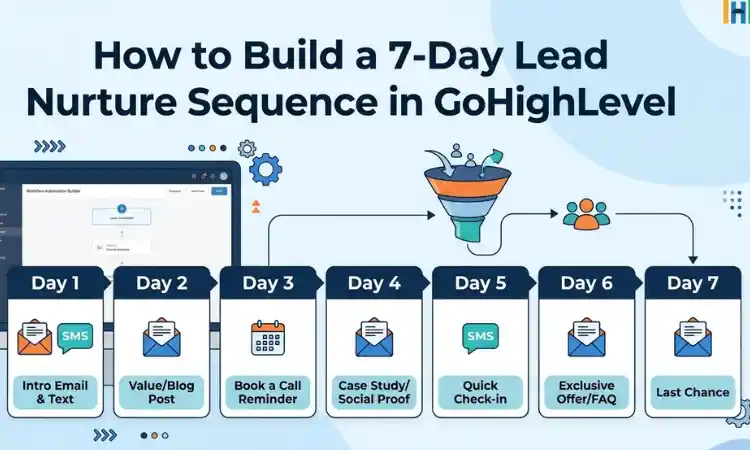
Step 3: Build the 7-Day Sequence Structure
Day 1: Welcome and Introduction
Send a welcome email and SMS immediately after the lead signs up. Introduce your brand and set expectations.
Day 2: Provide Value
Share helpful content such as tips, a guide, or a short video that solves a small problem.
Day 3: Build Authority
Show proof through case studies, testimonials, or results.
Day 4: Address Objections
Answer common questions or concerns that might stop a lead from taking action.
Day 5: Offer a Solution
Present your product or service clearly and explain how it helps.
Day 6: Create Urgency
Introduce a limited-time offer, bonus, or incentive.
Day 7: Call to Action
Encourage the lead to book a call, make a purchase, or take the next step.
Step 4: Add Delays and Timing
Inside your workflow, add delays between each message. For example:
- Day 1 message immediately
- Wait 24 hours before Day 2
- Repeat for each day
This keeps communication consistent without overwhelming the lead.
Step 5: Personalize Your Messages
Use custom fields like name, location, or service interest to personalize messages. Personalized messages increase engagement and response rates.
Step 6: Track Engagement and Adjust
Monitor how leads interact with your sequence. Look at:
- Email open rates
- Click rates
- Replies
- Conversion rates
Use this data to improve your sequence over time.
Step 7: Integrate With Other Tools
If you use external tools like Google Sheets, CRMs, or ad platforms, you can connect them using Zapier.
Learn how to integrate here: GoHighLevel to Zapier Integration.
Common Mistakes to Avoid
- Sending too many messages in one day
- Using generic, non-personalized content
- Not including a clear call to action
- Ignoring analytics and performance data
- Overcomplicating workflows
When to Work With a GoHighLevel Expert
If you want advanced automation, segmentation, or multi-channel sequences, working with an expert can save time and improve results.
Experienced HighLevel developers can help design high-converting nurture systems tailored to your business.
Final Thoughts
A 7-day lead nurture sequence is one of the most effective ways to convert leads into customers using GoHighLevel. With the right structure, timing, and messaging, you can build trust and guide leads toward action automatically.
Start simple, test your sequence, and refine it over time. As your system improves, your conversions will follow.
Author Bio
Lead GHL Developer
Harry’s been deep in the GoHighLevel world for 7+ years, tackling everything from tricky automations to custom API integrations that make clients’ systems hum. If there’s a way to streamline a process, he’s obsessed with finding it. When he’s not coding, he’s probably testing new GHL updates way too late at night.